Automatic list cleanup
Unsubscribe people who have not opened or clicked for 30, 90, or 180 days. Off by default. Preview before you enable.
Automatic list cleanup removes inactive subscribers so the list stays healthy. It is off until an owner or admin calculates a preview and turns the switch on from that receipt.
Do not invent a custom inactivity unsubscribe with the API. Use this setting.
What it does
With Automatic list cleanup on, Lumail regularly scans SUBSCRIBED contacts and unsubscribes anyone who:
- has not opened or clicked a marketing email in the interval you chose (30, 90, or 180 days)
- has not come back through a cleanup recovery link in that same interval
- has been subscribed for at least 7 days
- has at least 5 delivered marketing emails
- has a trustworthy subscription history
- belongs to an organization whose tracking coverage has been intact for the full interval
Everyone else is kept or deferred. Preview never changes a contact. Enabling only turns the setting on — the next scan applies it.
Settings → Preview (dry run + 10-minute receipt)
        ↓
Turn the switch on
        ↓
Jobs tick scan (batches of 100)
        ↓
UNSUBSCRIBED  +  optional re-engagement email
        ↓
Click {{subscribeUrl}}  →  /resubscribe?token=…
        ↓
SUBSCRIBED again  (or confirmation email if double opt-in is on)
Enable it
- Open Settings → Configuration. The URL is
/orgs/[your-org]/settings/configuration. - Find the Automatic list cleanup card.
- Pick Remove after (30, 90, or 180 days). The select sits on the right, like the other switches.
- Leave Send a re-engagement email on if you want one last email before they stay off the list.
- Click Preview. Nobody is unsubscribed.
- Wait until the card shows how many would be removed (or Nobody matches.).
- Turn the switch on. The receipt expires after 10 minutes — preview again if it does.
- Click Save only if you changed the interval or re-engagement toggle without enabling.
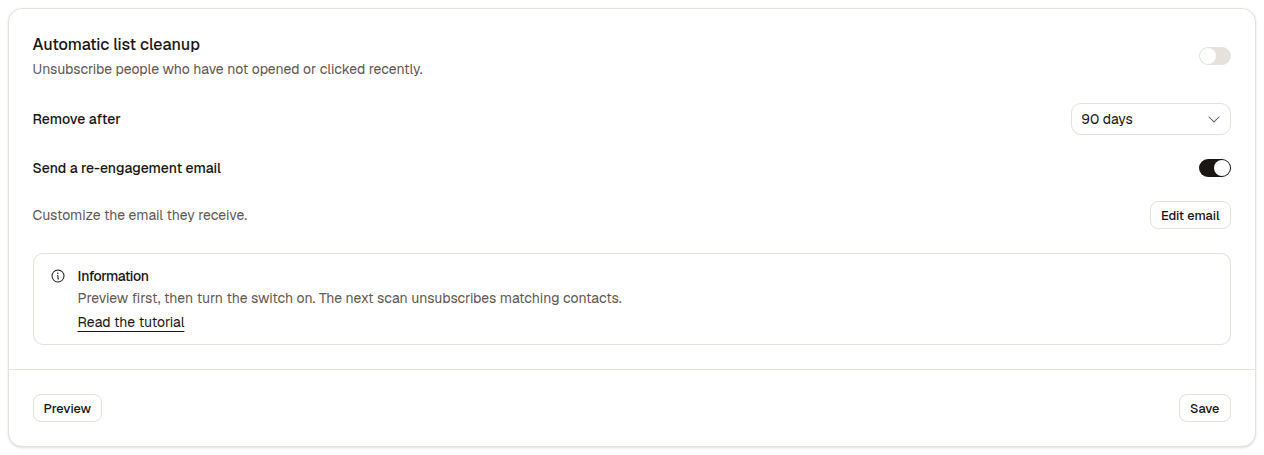
First card on Configuration. Off by default. Preview on the left, Save on the right.
| Control | What it does |
|---|---|
| Automatic list cleanup | Off until a completed preview receipt exists. On starts scans. Off disables immediately — no preview needed |
| Remove after | Inactivity window: 30, 90, or 180 days. Default 90 |
| Send a re-engagement email | After unsubscribe, send one transactional email with {{subscribeUrl}}. Default on |
| Edit email | Opens the re-engagement editor (only when the re-engagement switch is on) |
| Preview | Saves the interval + re-engagement toggle, then counts who would be removed. Does not enable |
| Save | Persists interval and re-engagement. Cannot turn the feature on |
Turning the main switch on without a completed preview shows Preview first. Changing the interval or re-engagement toggle after a preview invalidates the receipt — preview again.
When the preview finishes, the card shows Nobody matches. or N would be unsubscribed. plus sample addresses. Enabling still requires that completed receipt, even if the count is zero.
Who is never removed
| Keep / defer | Why |
|---|---|
| Open or click in the interval | Recent activity |
Came back via /resubscribe in the interval | Recent recovery |
| Subscribed less than 7 days ago | New subscription |
| Fewer than 5 delivered marketing emails | Not enough sends to judge inactivity |
| Subscription history unknown | Missing or untrustworthy SUBSCRIBED event |
| Tracking coverage unproven | Opens/clicks have not been recorded for the full window |
A brand-new organization cannot auto-remove anyone until one full selected interval after tracking coverage starts. Existing organizations inherit coverage from the organization creation date. If tracking drops (abandoned batch, DLQ, force-ack, email purge), the coverage clock resets and cleanup defers again until a full interval of intact tracking.
Transactional, pending, already unsubscribed, and bounced contacts are outside the candidate set.
Re-engagement email
Optional. Default subject is Are you still interested?. Default preview is Stay on the list or we'll stop sending.
Unsubscribe is applied first. The email is sent afterwards on the confirmation/transactional path — not as a campaign. If sending fails or is skipped, they stay UNSUBSCRIBED. Lumail logs the failure.
The template must include a real button or link with {{subscribeUrl}}. Type @ and pick Re-subscribe URL, or put {{subscribeUrl}} on a button URL. Missing it refuses the save.
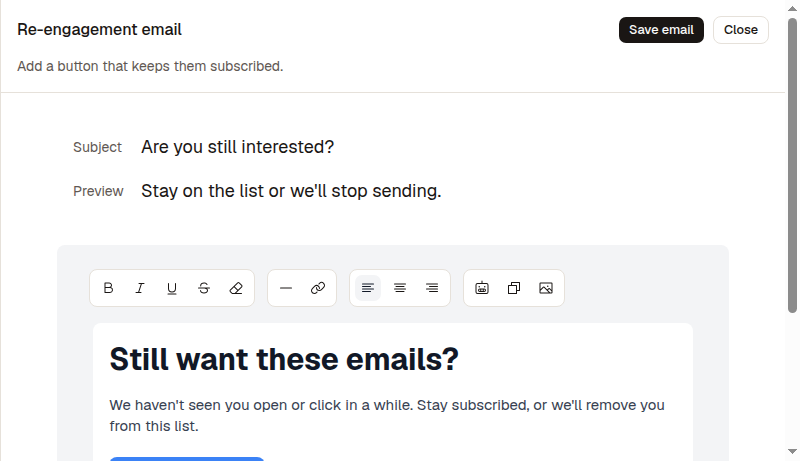
Subject, preview, and body. The button must point at {{subscribeUrl}}.
| Data point | Detail |
|---|---|
| Subject / Preview | Inbox subject and preview text |
{{subscribeUrl}} | Required. Opens /resubscribe?token= (24-hour single-use token) |
{{unsubscribeUrl}} | Optional. Default footer includes it |
{{name}} / fields | Same subscriber variables as campaigns. @ opens the menu |
| Snippets | Type / to insert an organization snippet |
| Default sender | Always the organization's default sender |
| Save email | Writes the template. Missing {{subscribeUrl}} is rejected |
Recovery page
The re-engagement link opens /resubscribe?token=….
- The page shows Stay subscribed? and a prefilled email field.
- They confirm the address and click the button. A different email is rejected.
- If they are already
SUBSCRIBED, it says so and stops. - If double opt-in is on, status becomes
PENDING_CONFIRMATIONand they get the confirmation email. Campaigns wait for that click. - If double opt-in is off, they become
SUBSCRIBEDimmediately. Unsubscribe guards are cleared. Workflows are not published from this recovery.
The token lasts 24 hours and is single-use. A second click on a used or expired link fails.
Timeline
Filter a subscriber timeline by Automatic list cleanup.
| Event | Copy |
|---|---|
AUTOMATIC_LIST_CLEANUP (admitted) | was queued for automatic list cleanup |
AUTOMATIC_LIST_CLEANUP (finalized) | was removed by automatic list cleanup |
UNSUBSCRIBED (source: AUTOMATIC_LIST_CLEANUP) | was unsubscribed by automatic list cleanup |
SUBSCRIBED (source: AUTOMATIC_LIST_CLEANUP_RECOVERY) | came back from automatic list cleanup |
Unsubscribe reason stored on the contact is Automatic list cleanup.
After you enable
Scans keep running while the switch is on (same periodic jobs tick as due campaigns). Each pass looks at up to 4 organizations and 100 candidates per organization.
Disable anytime with the switch. No preview required. Existing unsubscribes stay unsubscribed — disable does not restore them.
Do not enable from the raw configuration API. Ask Lumail can preview and enable only with a completed receipt (preview_list_cleanup then enable_list_cleanup). update_list_cleanup_settings can disable or change the interval; it cannot turn the feature on.
Related documentation
- Enable Double Opt-In — recovery sends a confirmation email when DOI is on
- Subscriber Events — timeline events
- Bot detection — how opens and clicks are recorded
- GDPR in Lumail — consent and unsubscribe evidence
- Account Verification — list hygiene and sender health